
Sometimes, when editing capabilities in the Role Editor, you might remove a permission you actually need — leaving you or other users unable to access parts of your site. The Members plugin includes a built-in tool to reset the five default WordPress roles back to their original capabilities.
Before proceeding, generate a full backup of your website.
Resetting will delete any custom roles you created with Members. You’ll need to recreate them afterward. Roles added by other plugins (e.g., WooCommerce) are not affected.
Reset using the Members settings
- Go to Members → Settings in your WordPress admin.
- Scroll to the Miscellaneous section.
- Next to Reset Roles, click Reset to Default WordPress Roles.
- Confirm the action when prompted.
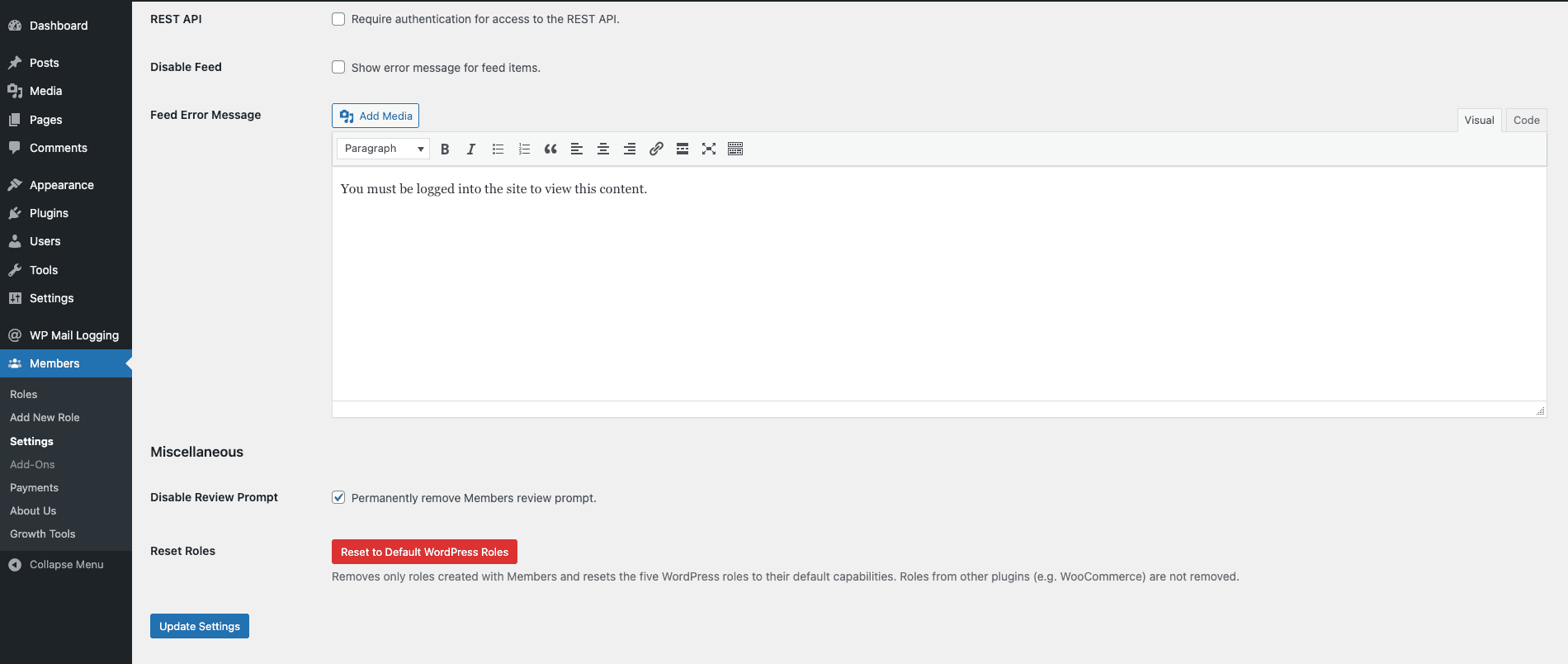
This restores Administrator, Editor, Author, Contributor, and Subscriber to their default WordPress capabilities, and removes any custom roles created with Members.
If you’re locked out of the admin
If a capability change has locked you out of wp-admin entirely, you won’t be able to reach the Members settings to use the reset button. Use the Administrator Rescue Link to restore your access, then return to Members → Settings and use the Reset to Default WordPress Roles button to repair the role capabilities themselves.